
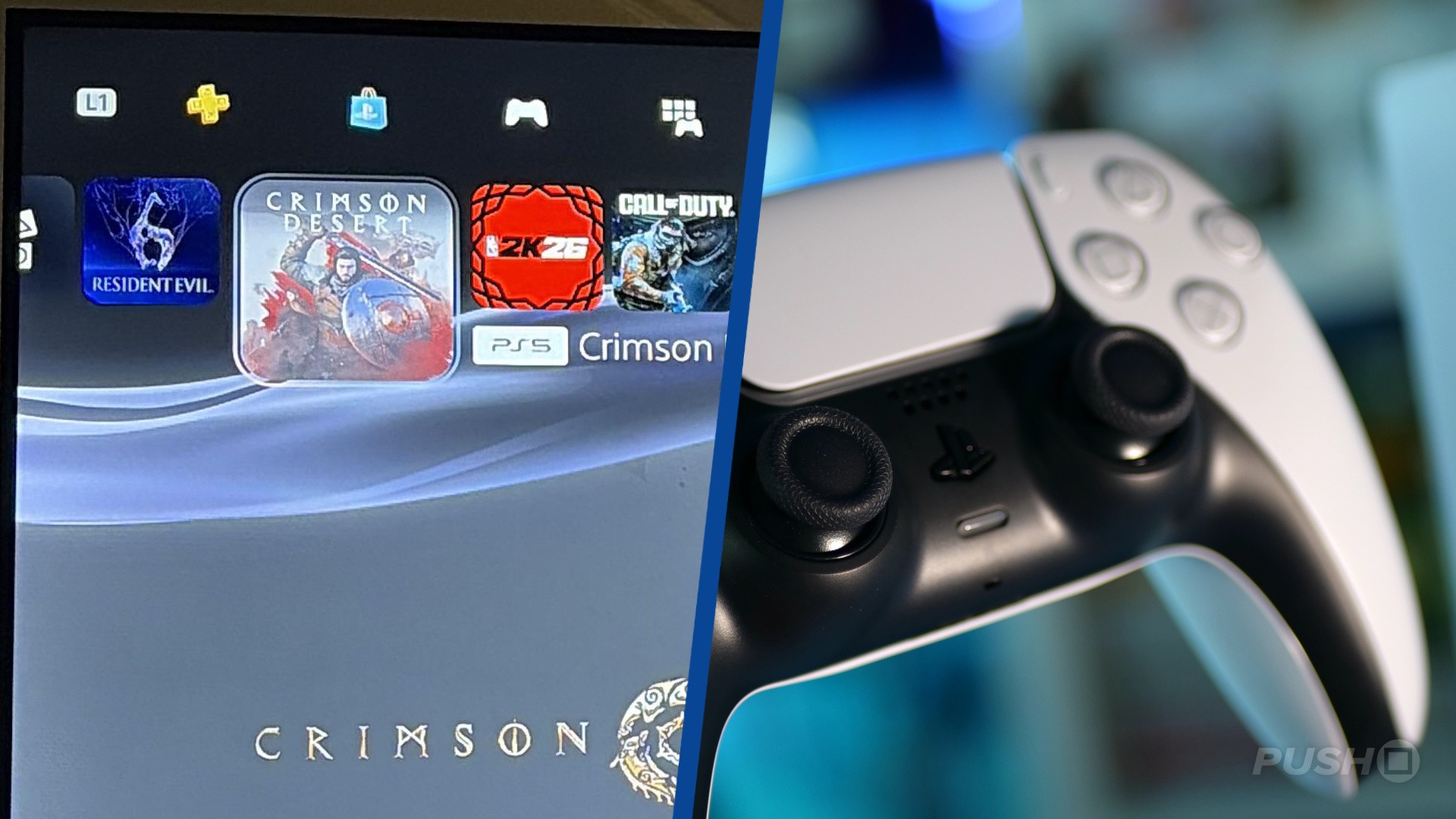
An updated PS5 home screen has gone live for certain console owners that makes some minor tweaks to the positions of your PS5, PS4 games and the PS Plus, PS Store, and Library widgets on the page.
Those with the update have had their horizontal scrolling bar now entirely filled with PS5, PS4 games. The PS Plus and PS Store tabs have been moved up to a second menu, where you can quickly switch between them and your Library and Media with L1 and R1 button presses.
Reddit user FSTGang posted a capture of the updated PS5 home page, who said they're in the firmware beta program:
The Welcome page remains at the start of your PS5, PS4 games list, but the previous toggle between your games and media apps has been replaced with the expanded options, featuring PS Plus and the PS Store. Giving you much faster access to more apps within the PS5 ecosystem, it looks to be a smart update.
We can probably expect this visual refresh to roll out to all PS5 users in the coming months.
Do you like the updated look? Let us know in the comments below.
[source reddit.com]


Comments 30
Nice to see CD featuring heavily up there!
@THEBrew Also Roblox, CoD, NBA 2K, Fortnite, GTA... they're the dictionary definition of a filthy casual.
(that's said tongue-in-cheek).
Ngl, I don't like the look of this at all.
Much improved. Now to scrap the welcome page.
I like the change but it does pose a question: why do we have to wait for simple QoL improvements until 6-7 years into console lifecycle?
And in next couple of years loop starts again, PS6 will most likely launch with barebones dashboard and we'll relearn all these lessons again..
Bring back the ps3 cross media bar
Only 5 years later but hey! better late than never 😂🙌
@scottXedgar Nah i like the welcome page.
It always felt to me that the team that builds the UI for Sony TVs did the PS5 UI. It has/had that clunky 'just functional' feel to it and had so many button presses to get to what you need. I'm used to it now, but it's still lacking compared to other UIs.
The PS4 UI felt like a gamer had hands on it at some point, even if it was laggy.
Don't think I ever have problems with UI in general except with some Japanese games like FF, Trails in the Sky, PES/eFootball- why are they so basic in this day and age with the most boring fonts possible, is it intentional...
@DennisReynolds Your right. I wad having flashbacks to when it was a first party advert page.
Just give us folders, ffs!
Every time they just bodge something else in to try and paper over the obvious omissions.
@katamariUK PS4 isn't laggy with an SSD in the internal slot (fairly sprints along) but you're absolutely right, the PS5 layouts & button presses are counter-intuitive when the PS4 had a hold down the PS button popup menu to do all the major things.
Hope whoever did the PS4 UI (or even the PS3 XMB) would do the PS6 UI and give us folders and themes from the off
@THEBrew its to try and hide the fact they have RE6 on the console lol
On the one hand it's great to have less cruft in the home screen, but OTOH it will be very annoying if it now takes multiple R1 presses to get to streaming apps, I'd get rather put all the cruft to the left so muscle memory is preserved to the stuff I do frequently, and new behaviour is only needed for the sure you do less often. It's basic UX design, but what do I know?
@katamariUK it’s still roughly 200 times better than the original Nintendo switch! That was a boring UI.
Love what I'm seeing but unfortunately I don't have it yet.
There was nothing wrong with the original UI, but I like it 🤷♀️
@sanderson72 the PS5 layouts & button presses are counter-intuitive when the PS4 had a hold down the PS button popup menu to do all the major things
I had major issues with this when I first got my PS5 as it was annoying to retrain you brain. I did boot my PS4 up again recently however to reset it for trading in and I found the opposite where I couldn't recall how to do anything, and it never occured to me to hold the button. I don't think one is better or worse than the other, but the shift from one to the other was a pita.
EDIT: Folders would be great, they were brilliant on the 4
Horrible change.
I actually like it as it clears up the home page to only show games and gives a quicker access to the game library, if the upper tabs were customizable it’d be perfect.
@ilyn I had to Google how to close down a game on a PS5.
For that reason alone, the 5's UI is a fail. Why not keep the pop up menu when holding the PS button so you can a) close a game b) switch off the console c) turn off a controller, etc?
@Americansamurai1
Yes please and the dynamic themes as well
So long as it's optional
@sanderson72 It could be worse it took me half an hour to find the disc drive day one. I thought he'd accidentally gotten me a digital model. I'd been shoving discs everywhere but the drive. I'm sure I'm not the only one, it's hidden really well. The UI was it's own journey, someone else deciphered that.
@The-punishr you would think sony would be all in on dynamic themes since they could sale them.
Folders please and the ability to change the background colour....
Can't they just go back to PS4 or PS3 interface! PS5 and PS Store interfaces and are lame!
New home screen is not bad. I like it.
Off topic. I'm not used to the virtual keyboard of the PS5. The PS4 one is much better and was more convenient. On ps4, to get to symbols you had to hold l2 and press l3 or r3. I would like to send Sony this feedback, but I don't know how.
How am I supposed to test or use the new PS5 Pro Home Screen.
When the PS5 Pro won’t even power on plugged in through the tv?
This is how it always should have been to be honest.
Show Comments
Leave A Comment
Hold on there, you need to login to post a comment...